"TOWARDS SUSTAINABLE FUTURE"

XP-GTR1500L
XP-GTR1500L
Single Door Access Control Reader with Keypad, LCD and Built-In Controller
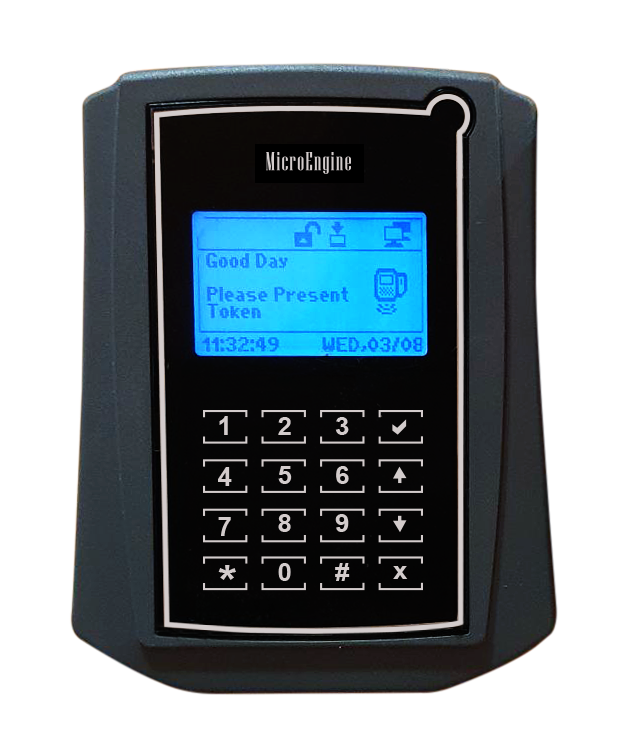

- Reader with Touch Sense Keypad
- Built-in LCD Screen
- Built-in Controller & LAN
- Support Programming through Keypad & LCD at the reader
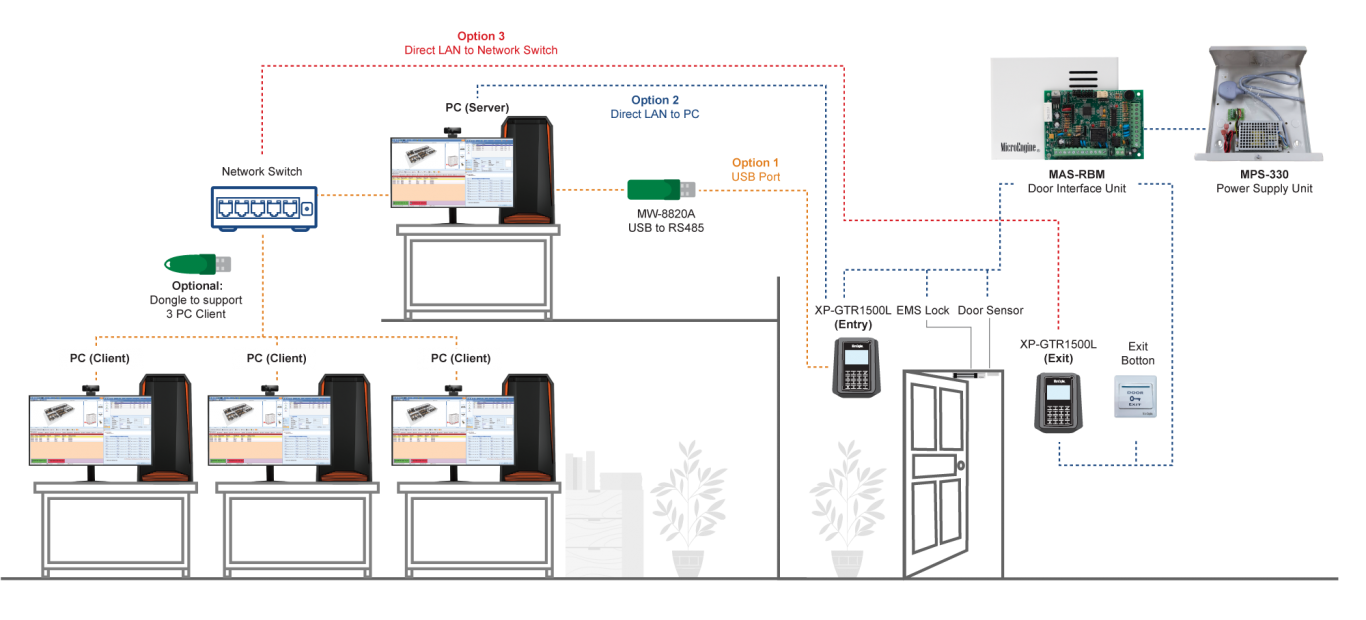
FeaturesConfiguration DiagramDocumentationPC RequirementsFAQ
| Features | Functions | |
| 1. | Card User Memory | 1,500 |
| 2. | Transaction Records | 50,000 |
| 3. | Single Unit Reader, Keypad & Controller | Yes |
| 4. | Build-In Card Reader | Yes – EM Card (Mifare Card with Mifare Sector Reading Model Available) |
| 5. | Access Operation Mode | Card Only, PIN Only, Card + PIN |
| 6. | Fingerprint Template Capacity 1:N |
No |
| 7. | Display | 128 x 64 Graphic Display with Back Light |
| 8. | Keypad | Touch Sense Keypad with Backlight |
| 9. | Time Set & Time Zone | 99 |
| 10. | Holiday Dates | 40 |
| 11. | Auto PIN | Not Available |
| 12. | Built-in Real Time Clock with Battery | Yes |
| 13. | Car Park Mode External Entry Reader | No |
| 14. | Exit Reader | Yes |
| 15. | Exit Push Button | Yes – with Time Zone Control |
| 16. | Support Wiegand 26-bit Reader | Yes |
| 17. | Anti-Passback | Yes |
| 18. | Controller Operation Mode | Access Control Mode |
| 19. | Supports Programming Through Keypad & LCD at the Reader |
Yes |
| 20. | Lock Control, Door Sensor & Exit Button Input | Yes – Through MAS-RBM Located Inside the Door |
| 21. | Configurable Lock Release Time | Yes – 0-99 secs. |
| 22. | Configurable Door Open Time | Yes – 0-99 secs. |
| 23. | Auto Lock Release Time Zone | Yes |
| 24. | Sensor & Output | No |
| 25. | Data Flash Memory | 32MBit |
| 26. | Onboard Buzzer | Yes |
| 27. | Communication Ports | RS485 / LAN |
| 28. | Can be Linked to PC for Software Control | Yes |
| 29. | Power | 12VDC |
| 30. | Dimension | 152mm (H) x 122mm (W) x 32mm (D) |
| No | Documentation |
| 1. |  DATASHEET-2025_XP-GTR1500L DATASHEET-2025_XP-GTR1500L |
| No | System | Requirements |
| 1. | CPU (Recommended) | Intel Core i5-5220U, 2.2 GHz or Higher |
| 2. | RAM (Minimum) | 4 GB |
| 3. | OS | Microsoft Win 7/8/10 Pro, 2003/2008 Server (Home/ Starter /Single Editions Not Supported) |
| 4. | Microsoft.Net Framework | Yes (Version 3.5) |
| 5. | Ethernet & Serial Port | Yes |
| 6. | USB Port | Yes |
| 7. | Display (1024 x 768 x 16 Bit Colours) | Yes |
| 8. | Mouse / Keyboard | Yes |
| 9. | Hard Disk (Free Space) | 50 GB |
FAQ
XP-GT/GTR Setup Guide(Network Setting)
1. I have purchased XP-GTR1500L and I need to…
- To install the controller, follow the wiring connection diagram provided, see article ID: AA-00362
- To configure the uplink connection, see article ID: AA-00267 if using network connection, or see article ID: AA-00269 if using RS485 connection
- To install new user without the card, and using ID Number as staff identification, see article ID: AA-00314
- To add fire alarm panel, see article ID: AA-00351
2. I have installed XP-GTR1500L at my site, but how do I configure the controller
- The meaning of the symbol on the XP-GT/ XP-GTR controller, see article ID: AA-00429
- To set the controller as entry and exit door for single door only, see article ID: AA-00211
- To enter Programming Menu, see article ID: AA-00272
- To install new user without the card, and using ID Number as staff identification, see article ID: AA-00314
- To add fire alarm panel, see article ID: AA-00351
3. Troubleshooting Guide
- Controller status showing “Down”, see article ID: AA-00271 to check the uplink connection
- Lock does not release after flash a valid card. See article ID: AA-00362. If problem persists, check the downlink connection. See article ID: AA-00270
- Can XP-GTR1500L read Mifare card? No, it cannot read Mifare card. Further information, see article ID: AA-00431
- The controller status (LAN) always switch up to down frequently, see article ID: AA-00337
- User can exit from entrance door when the door have been blocked, see article ID: AA-00360
Video Tutorials
XP-GT/GTR Setup Guide(Network Setting)