"TOWARDS SUSTAINABLE FUTURE"

xPortalNet v1.7
xPortalNet v1.7
Integrated Security Management System
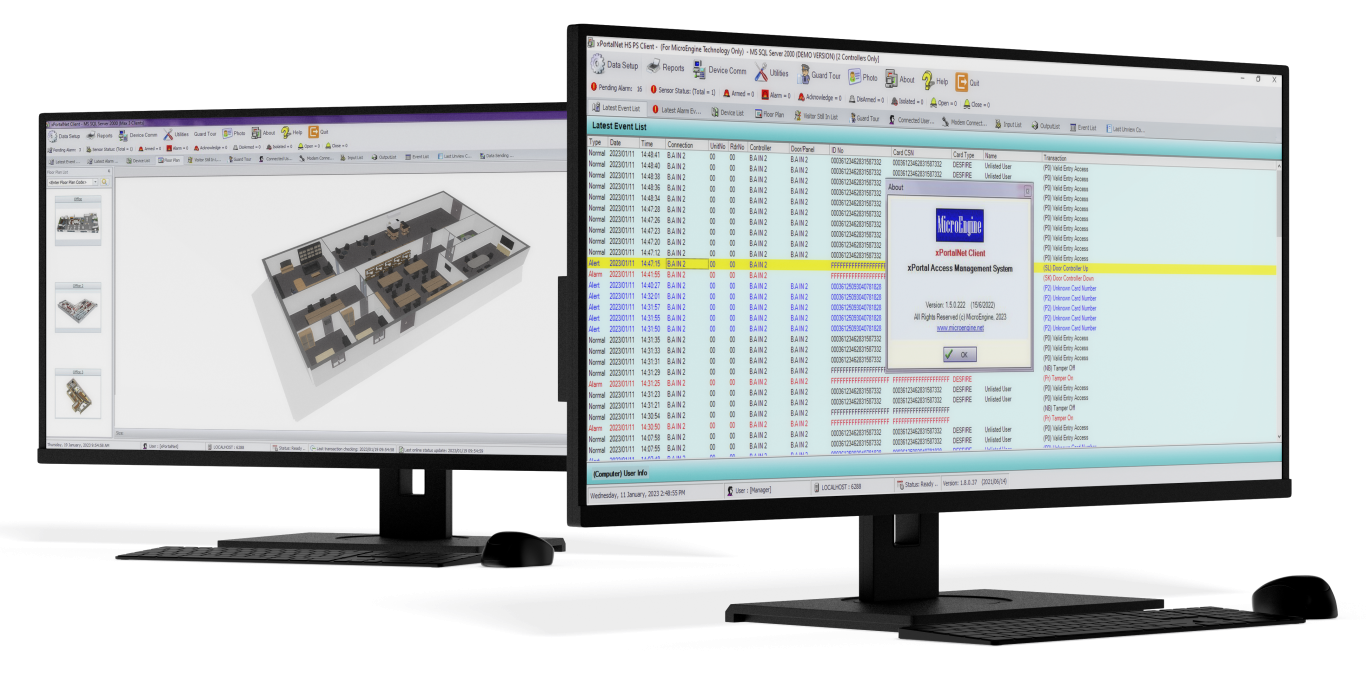
xPortalNet v1.7
MicroEngine xPortalNet v1.7 is an enterprise-level software platform that enables access control management and surveillance across multiple buildings and locations. The software supports various controller models, including M series and Q series, and offers advanced alarm processing capabilities. xPortalNet v1.7 is scalable and provides optional add-on modules to meet different business needs. It is flexible to integrate with third-party systems and includes many other features to provide a comprehensive security solution.
xPortalNet v1.7 Features :
- Redundancy with Hot Standby Server
The redundancy feature is designed to minimize downtime and ensure system availability in the event of a failure. The hot standby system is kept in a ready state, continuously synchronised with the active node, and can assume control within seconds of the failure of the active node. - Various Access Token Types
Offers multiple types of access tokens, including MIFARE card (CSN/ Card Id), DESFire, DESFire DFM, QR Code (Dynamic / Static), Fingerprint, ID, and Facial. - Efficient Alarm Handling
Provides efficient alarm management with priority levels, response instructions, and audible and visual indicators. The system displays real-time video and relevant floor plans for quick situation assessment and can send mobile or email alerts to security personnel for prompt response. - Streamlined Visitor Management
Enables the tracking of visitor movements, searching of past visit records, and blacklisting of unwanted visitors. The system also ensures compliance with data retention principles by automatically removing visitor records and signing out visitors. - Using Microsoft SQL Server
Uses Microsoft SQL Server as the DBMS, offering benefits such as scalability, strong security features, and easy integration with other Microsoft technologies. - Flexible Interfacing Tools
Offers various interfacing tools such as REST APIs, OPC Data Access, Modbus, TCP push transaction, and more, allowing users to extend the software’s functionality and customize it to their specific business requirements. - Multi-Tenancy Module
In a multi-tenant environment, the software guarantees data segregation and security by restricting users to only manage and generate reports for their respective partitions. The system empowers partitioned users to manage and configure their own access control settings, without the involvement of system administrators, providing a self-sufficient and streamlined approach to access control management.
| No | Features |
Description
|
|
xPortalNet v1.7 PS
|
||
| 1. | Controller Supported |
XP-M1000i-SE21, XP-M1300i/IP, XP-M2300i/IP, XP-M4L/IP, XP-SNET/IPC, XP-SNET-GAC/IPC, XP-GTR1500L, XP-GTR1500LABX, XP-GT3500L, XP-GT3500LABX, XP-GT10KL, XP-GT10KLABX, XP-Q1200/IP, XP-Q2200/IP, XP-QNET/IPC, XP-QNET-GAC/IPC
|
| 2. | Connectivity |
LAN
|
| 3. | Max. Connections (Built-In) |
200 (Requires Remote Communication Gateway for additional connections)
|
| 4. | Remote Communication Gateway |
Optional, each instance adds another 128 connections.
|
| 5. | No. of Concurrent Client Access |
3
|
| 6. | Max. No of Concurrent Client Access (Optional) |
20
|
| 7. | Database |
MS SQL Server
(Note: Limited database & memory size if using MS SQL Server Express edition and system may not function well for larger installation) |
| 8. | Configurable Card Number Length |
6 to 16 digits
|
| 9. | Card User Capacity |
200,000
|
| 10. | Import Card Holder Records |
Support .txt, .csv, .xls, .xlsx. Import options include add, update, and delete
|
| 11. | Server runs as Windows Service |
Yes
|
| 12. | Redundancy |
Yes (Optional)
|
| 13. | API |
Yes (Optional)
|
| 14. | CCTV Integration |
Yes
|
| Window live preview, event trigger pop-up (up to 4 cameras), live recording, screenshot, PTZ control, searching, playback, pre and post-event playback, PTZ preset activation by event.Brand: Panasonic, Hikvision, Dahua, UniView, Bosch VMS, Hanwha, Milestone XProtect, exact Vision, Generic RTSP. |
||
| 15. | Multi-Tenancy |
Yes
|
| Data Partitioning (configurable door / staff that can be viewed and managed, hiding unauthorised data for selection and control) |
||
| 16. | Access Control |
Yes
|
| 17. | Lift Access |
Yes
|
| 18. | Hardware-Based Alarm Monitoring |
Yes
|
| 19. | Door Monitoring |
Yes
|
| 20. | Time Attendance |
Yes
|
| 21. | Online Guard Tour |
Yes
|
| 22. | Door Access Level |
255 / 9999*
|
| 23. | Time Zone |
255
|
| 24. | Time Set (3 intervals) |
255
|
| 25. | Holiday |
30
|
| 26. | Floor Zone |
255, by controller
|
| 27. | Floor Access |
255
|
| 28. | High Level Lift Interfacing |
Yes – Using SGate
|
| 29. | Global Antipassback |
Yes – Using QNET-GAC
|
| 30. | Fire Alarm Release by Group (Door, Output) |
Yes
|
* The feature listed here are for the software only. It depends on the choice of the hardware system such as controller, I/O board, readers and computer system for it to work. Kindly contact our representatives for further clarifications.
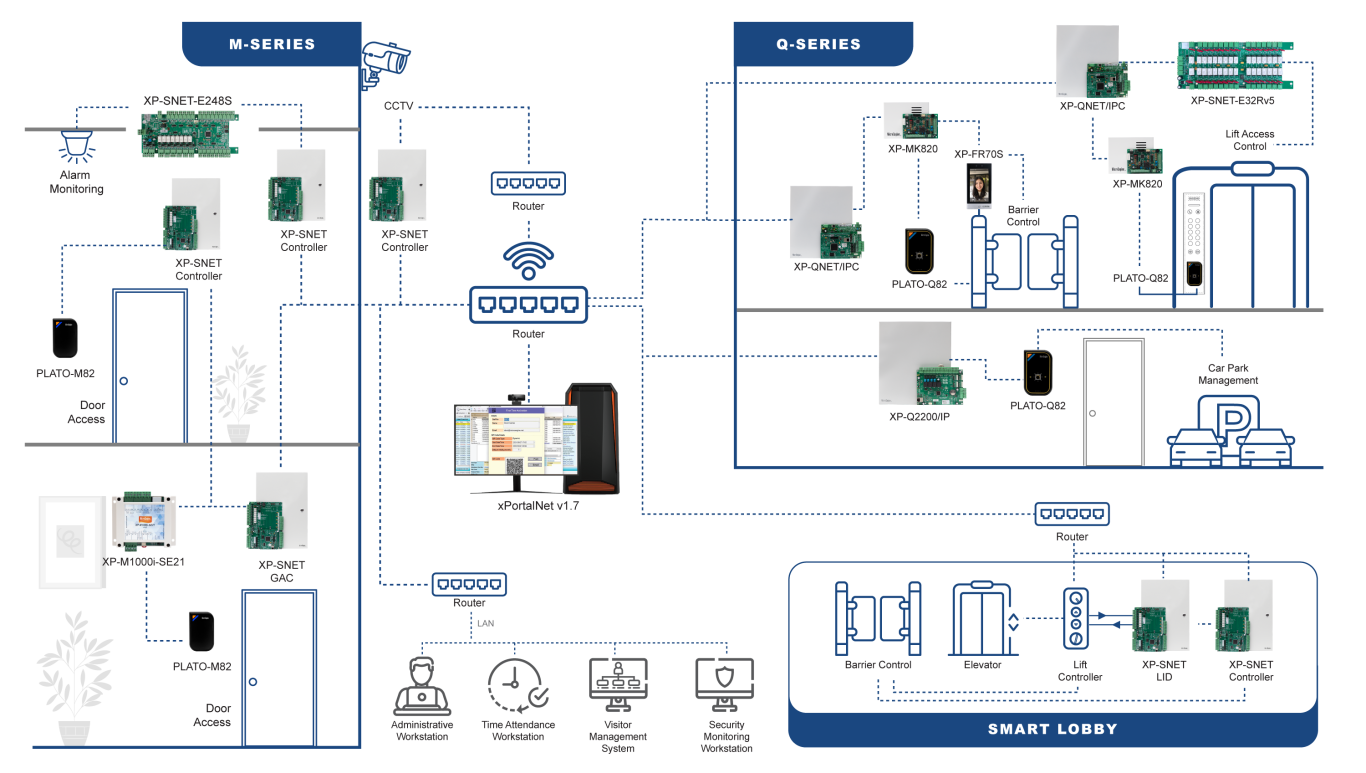
| No | Item | Features |
| 1. | XP-M1000i-SE21 | 1 Door Network Controller. Max.2 RS485 In & Out Readers Connection. 1 Relay Output & 4 Inputs.10,000 Users, 50,000 Event Transactions. TCP/IP. Power Supply & Back Up Battery with Metal Enclosure. |
| 2. | XP-M1300i/IP | 1 Door Network Controller. Max 2 RS485, In & Out Readers / 2 Weigand Reader Connection. 2 Relay Outputs & 6 Inputs. 30,000 Users, 50,000 Event Transactions. TCP/IP. Power Supply & Back Up Battery with Metal Enclosure. |
| 3. | XP-M2300i/IP | 2 Door Network Controller. Max 4 RS485, 2 In & 2 Out Readers / 2 Weigand Reader Connection. 4 Relay Outputs & 11 Inputs .30,000 Users, 50,000 Event Transactions. TCP/IP. Power Supply & Back Up Battery with Metal Enclosure. |
| 4. | XP-M4L/IP | Lift Access Controller. Max 4 COP Panel. 10,000 Users, 50,000 Event Transactions. TCP/IP. Power Supply & Back Up Battery with Metal Enclosure. |
| 5. | XP-Q1200/IP | 1 Door Advanced Multi-Class MIFARE-DESFire & QR (Dynamic) Network Controller. High Security Dual ID Matching. Max.2 RS485 In & Out Readers/ 2 Weigand Reader Connection. Relay Outputs & 6 Inputs. 20,000 Users, 50,000 Event. Encrypted TCP/IP. Power Supply & Back Up Battery with Metal Enclosure. |
| 6. | XP-Q2200/IP | 2 Door Advanced Multi-Class MIFARE-DESFire & QR (Dynamic) Network Controller. High Security Dual ID Matching. Max.4 RS485 2 In & 2 Out Readers/ 2 Weigand Reader Connection.4 Relay Outputs & 11 Inputs. 20,000 Users, 50,000 Event. Encrypted TCP/IP. Power Supply & Back Up Battery. Metal Enclosure. |
| 7. | XP-SNET5 | 5 Doors Ethernet Access Controller. 5 RS485 In/Out / 5 Weigand Reader Connection. 8 Relay & 16 Input. 50,000 Users, 100,000 Event Transactions. RS485 Communication & TCP/IP. Power Supply 10A, 12VDC & 12AH Battery. Metal Enclosure. Support Door Access, Lift Access & Alarm Monitoring |
| 8. | XP-SNET/IPC | 5 Doors Ethernet Access Controller. 50,000 Users, 100,000 Event Transactions. TCP/IP communication. Power Supply 3A, 12VDC & 7AH Battery. Metal Enclosure. Support Door Access, Lift Access & Alarm Monitoring. |
| 9. | XP-SNET-GAC | Master Controller For Global Anti-Passback. Switching power supply battery charger. 12AH Sealed Lead-Acid Rechargeable Battery. |
| 10. | XP-SNET-GAC/IP | Master Controller For Global Anti-Passback. HENGFU switching power supply battery charger. 7AH Sealed Lead-Acid Rechargeable Battery. |
| 11. | XP-QNET | 5 Door Multi-Function IP DESFire QR Network Controller. HENGFU Switching Power Supply Battery Charger. Back Up Battery. Metal Enclosure. Support Door Access, Lift Access & Alarm Monitoring. |
| 12. | XP-QNET/IPC | Multi-Function IP DESFire QR Network Controller. Switching Power Supply Battery Charger. Back Up Battery. Metal Enclosure. Support Door Access, Lift Access & Alarm Monitoring. |
| 13. | XP-QNET-GAC | Master Controller For Q Series Global Anti-Passback. HENGFU switching power supply battery charger. 12AH Sealed Lead-Acid Rechargeable Battery. 05 Door IP Centralized Controller Board Only. |
| 14. | XP-QNET-GAC/IPC | Master Controller For Q Series Global Anti-Passback. Switching power supply battery charger. 7AH Sealed Lead-Acid Rechargeable Battery. |
| 15. | PLATO-P80MS | Proximity Reader. 125 kHz EM. RS485. ABS Casing. MCMC Certified. |
| 16. | PLATO-P80KLS | Proximity Reader with Keypad & LCD. 125 kHz EM. RS485. Smart Touch Sense Keypad. Graphic LCD Display. ABS Casing. MCMC Certified. |
| 17. | PLATO-S82 | MIFARE / CEPAS Contacless Reader. 13.56 MHz ISO14443A / B. RS485. ABS Casing. Small Size. MCMC Certified. (Replacement Model for PLATO-C80S). |
| 18. | PLATO-M82 | MIFARE Classic / DESFire Advanced High Security Multi-Format 13.56 MHz ISO14443A / B. Encrypted RS485 – Read CSN and Encrypted Profile ID. ABS Casing. MCMC Certified. (Replacement Model for PLATO-RM80MS). |
| 19. | PLATO-K82 | MIFARE Classic / DESFire Advanced High Security Multi-Format 13.56 MHz ISO14443A / B. Color Graphics LCD. Touch Sense Keypad. Encrypted RS485 – Read CSN and Encrypted Profile ID. ABS Casing. MCMC Certified. (Replacement Model for PLATO-RM80KLS). |
| 20. | PLATO-Q82 | QR Code and MIFARE Classic / DESFire Multiple Card Format 13.56 MHz. Encrypted RS485 – Read CSN and Encrypted Profile ID . ABS Casing. MCMC Certified. (Replacement Model for PLATO-Q81MS). |
| No | Item | Features |
| 1. | CPU (Recommended) | 10th Generation Intel® Core™ i5 Processor or above |
| 2. | RAM (Minimum) | 8GB |
| 3. | OS | Microsoft Windows 10, 11 (Home & Starter Editions Not Supported) Microsoft Windows Server 2019, 2022 (64-bit, recommended Standard edition) |
| 4. | Ethernet | Yes |
| 5. | Hard disk (Minimum free space) | 50 GB |
| 6. | Microsoft .Net Framework | v4.0 |
| 7. | USB | Optional (required for USB smart card reader, webcam, QR code scanner) |
| No | Documentation |
| 1. |  Datasheet_2025 : xPortalNet v1.7 Datasheet_2025 : xPortalNet v1.7 |
FAQ
Video Tutorials
xPortalNetv1.7 Installation Guide (For Fresh Installation)
xPortalNetv1.7 Installation Guide (Database Migration Skipped)
xPortalNetv1.7 Installation Guide (With Database Migration)
xPortalNetv1.7 Hardware Setup Guide (Device Lookup)
xPortalNetv1.7 Hardware Setup Guide (New Controller Wizard)