
"TOWARDS SUSTAINABLE FUTURE"

XP-SNET5
Advanced Search
Search the Knowledgebase
Category
Multi Door Controller – XP-SNET5
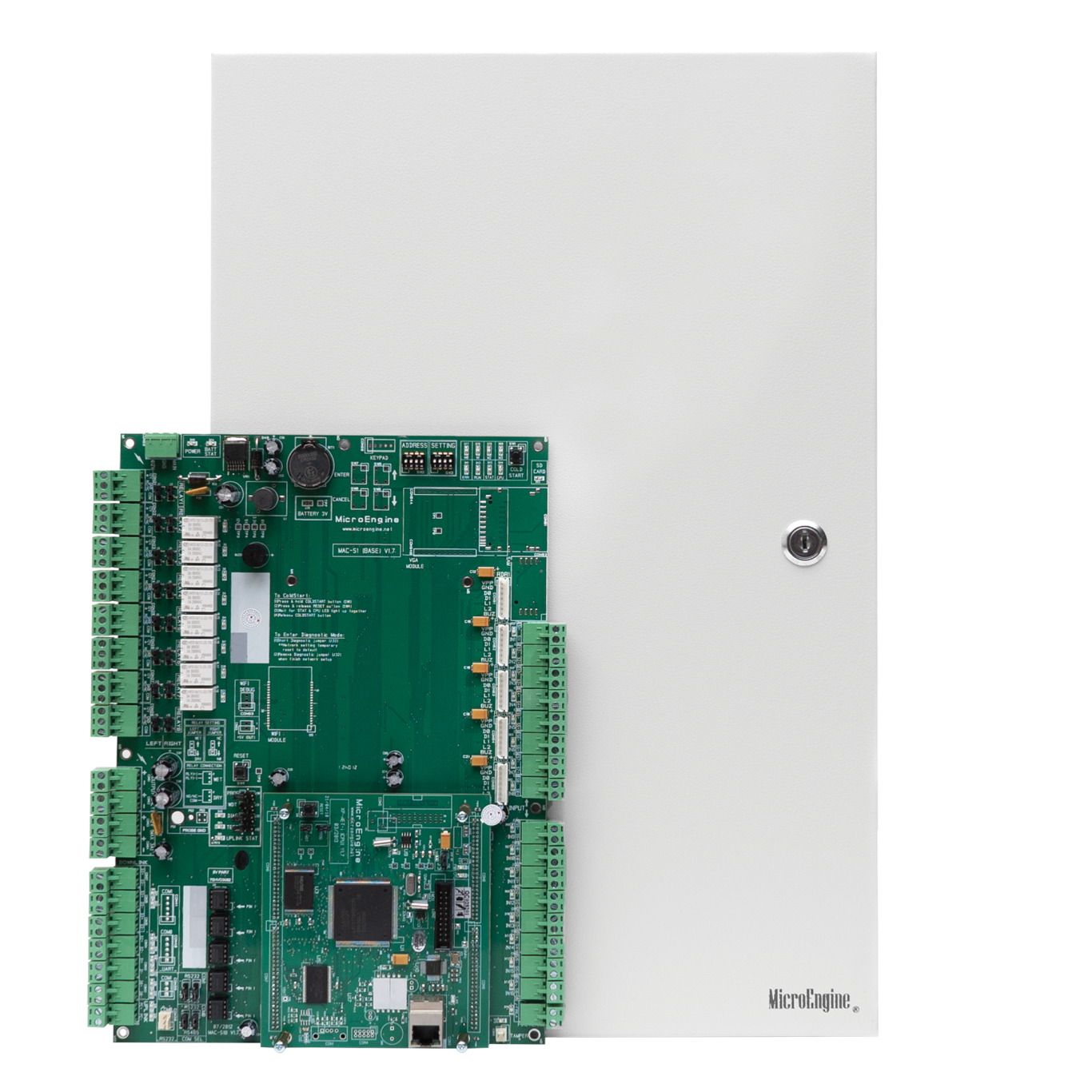

Modular System – Extension Board Based
- The system is designed to allow you to extend the capacity by simply adding extension boards onto it. This gives you the cost advantage when you are implementing minor capacity upgrades. Moreover, the extension board based design provides a consistent architecture in the system and thus promotes better maintenance quality by reducing the system learning time.
Centralised connection
- The cables are terminated in the controller. This allows faster data processing as transfer of data are all done onboard and the readers are directly connected to the controller.
- Centralised connection also promotes better deployment and maintenance quality. The engineers can perform the inspection and service all at one place and this can help to reduce the cost of maintenance operations.
Configurable to Distributed Architecture
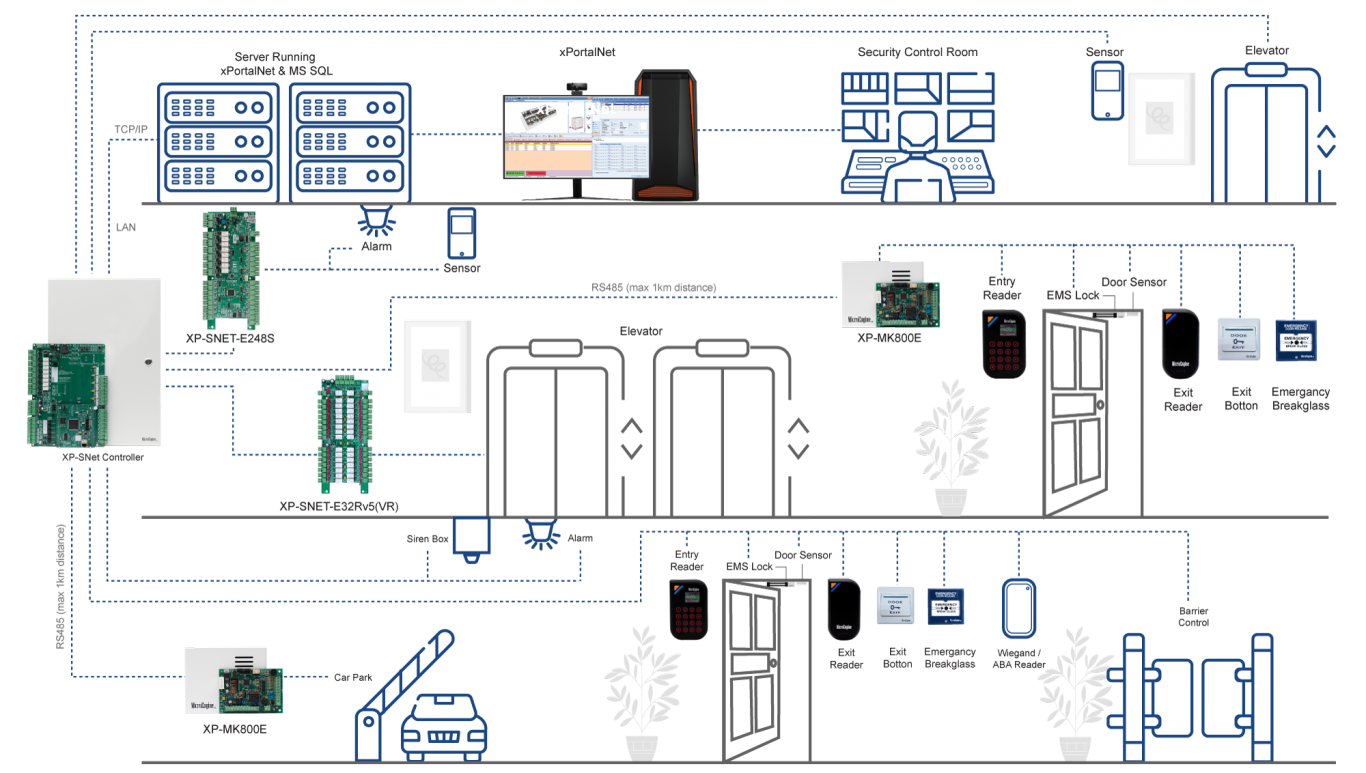
- Where remote interfacing of door / reader or I/O are required, the controller supports these remote interfacing modules (RIM) that connect to the controller using RS485.
- This is a flexible and powerful controller capability that gives you the benefit of both useful centralized and distributed architecture in one box.
Support Door, Lift, Alarm Monitoring
- The controller has been built for high end integrated security applications. It can support door access control, car park access control, lift access control and alarm monitoring.
- You can configure the capacity of the system by adding extension boards or remote interfacing modules.
32 bit ARM Processor
- The controller uses the 32bit ARM RISC processor at 72MHz. This is a powerful processor for industrial applications and it enables the system to process the complex applications in real-time manner.
Onboard IP with Encryption
- The controller is equipped with LAN connectivity at 10/100Base-T using TCP/IP protocol.
- It supports push based communication to computer for faster data transfer speed.
- The IP communication is encrypted using industrial standard AES128 for secured communication.
Remote Firmware Download
- Firmware can be downloaded from the application software via the IP interface.
- This helps to improve the maintainability of the controller at site. You can update or upgrade the firmware from the computer at site without needing to open the controller box or bring the controller back for service.
FeaturesConfiguration DiagramCluster ControllerDocumentationFAQ
| No | Item | Features |
| 1. | Max Door | 10 |
| 2. | Relay Output | No |
| 3. | Input | 1 Dedicated Fire Alarm Input, 1 Dedicated Tamper Input |
| 4. | IP | Encrypted IP LAN (10/100 Base-T) |
| 5. | Reader | • MicroEngine Plato Readers : Max 20 (10 Entry + 10 Exit) • Wiegand / ABA Readers : Max 20 (via XP-MK800E) |
| 6. | Comm. Port | Yes. • RS485 to Remote Interface Module • RS485 to Extension Boards |
| 7. | Card Number Length | Up to 16 Digits |
| 8. | Max Card DB | 50,000 |
| 9. | Max Transaction DB | 100,000 |
| 10. | Time Zone | 255 |
| 11. | Time Set | 255 |
| 12. | Floor Zone | 255 |
| 13. | Global Anti-Passback | Yes |
| 14. | Interlocking | Yes |
| 15. | IP Messaging Encryption | Encrypted with AES128 with Dynamic Key and Support Push Base |
| 16. | Alarm Monitoring Support | Yes |
| 17. | Extension | Up to 3 Extension Board : SNET-E5D : 5 Door Extension Board SNET-E32R : 32 Relay Output Board SNET-E248S : 24 Supervised Input & 8 Relay Output Board |
| 18. | Diagnostic | Yes, login through Built-In Web Browser |
| 19. | Processor | ARM RISC Processor at 72MHz |
| 20. | Remote Firmware Update | Yes. Can be done through application software at site. |
| 21. | Dimension | 310mm x 267mm x 72mm |
| 22. | Power Requirement | 12V @ 180mA (Base Board Only) |
| 23. | Controller Package PSU | 12VDC @ 5A with 7AH Battery |
* Depending on Model
SNet – GAC – Live Global Antipassback
– Add support Global Antipassback by cluster
| No | Item | Features |
| 1. | Connectivity to Controller | TCP / IP (Max 128 doors per cluster) |
| 2. | Real Time Location Update | Yes. GAC as centralized look up device with immediate location info update. Readers at other doors immediately obtained the latest location info of the card user. No waiting time required for data synchronization between controller |
| 3. | Power Requirement | 12V @ 2A |
SNet – LID – Lift Interfacing Device
– Add support for High Level Interfacing to Selected Lift Brand
| No | Item | Features |
| 1. | Communication to Lift Controller | By TCP / IP |
| 2. | Default / Auto Floor | Yes |
| 3. | Manual Floor | Yes |
| 4. | Multi Lift Controller | Up to 4 |
| 5. | Power Requirement | 12V @ 2A |
| No | Documentation |
| 1. |  Product Brochure: XP-SNET5 Product Brochure: XP-SNET5 |
FAQ