Country Flag

"TOWARDS SUSTAINABLE FUTURE"


XP-SR40

XP-SR40
xp_sr40-thumb

XP-SR40

  • Standalone Proximity Access System (Supports up to 40 card users, cater for small to medium size requirement)
BenefitsFeaturesConfiguration DiagramDocumentationFAQ
No Item Features
 1. Simple Design
  • Easy to use
  • Easy to maintain
  • Easy to program
 2. Pin Only Access
  • Use 4 digits secret code to access
  • Multiple sets of code
  • Codes can be re-programmed easily
 3. Proximity Card Technology
  • Easy to use
  • Reliable technology
  • High durability
  • Just touch the card to access
 4. Standalone Architecture
  • Easy to install
  • No PC is required to operate
  • LED and audio buzzer indication
 5. Reliable Technology
  • Designed with proven and reliable technology
  • Built-in System Integrity Monitoring System for maximum reliability
No Item Features
 1. Standalone Operations Yes
 2. Onboard Memory EEPROM Yes
 3. Pin Access No
 4. Card User Capacity 40
 5. Keypad No
 6. Continuous Card Read when door is opened Yes
7. Onboard Buzzer Yes
 8. Firmware Flash Memory Yes
 9. Polarity Protection for Power Input Yes
 10. LED Indication Yes (Red & Green)
 11. Durable Epoxy Coated Keypad No
 12. Power 12VDC Yes (200mA)
 13. Dimension (H x W x D) 100mm x 53mm x 20mm
 14. Configurable Lock Release Time No (Fixed to 10sec)
 15. Configurable Door Open Time No (Fixed to 20sec)
 16. Controller/Reader Mode No

* Specifications subject to change without prior notice
configuration1

XP-SR40 configuration2

No Documentation
1. PDF-Icon Product Brochure: XP-SR40

FAQ

1. I have purchased XP-SR40 and I need to...
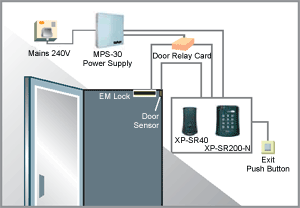
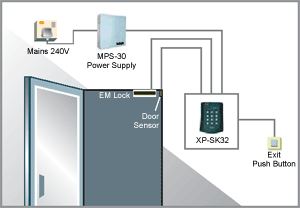
  • To install the reader, follow the wiring connection diagram provided, see article ID: AA-00242
2. I have installed XP-SR40 at my site, but how do I configure the controller
  • To reset the controller to factory default setting (Coldstart), see article ID: AA-00241
  • To program Master Card, see article ID: AA-00245
  • To install, delete and clear all cards, see article ID: AA-00246
3. Troubleshooting Guide
  • The reader keeps on produced beeping sound when door is closed, see article ID: AA-00247
  • The reader keeps on produced beeping sound every 1 second, see article ID: AA-00251
  • EM lock does not release when exit button is pressed, see article ID: AA-00248
  • EM lock does not release after scan a user card which has been installed, see article ID: AA-00249
  • EM lock always in disengage/ release condition, see article ID: AA-00250
  • 6. Can I create a copy/ duplicate the Master card? No, you can’t. The Master card only can be initialized once after the reader has been Coldstart. See article ID: AA-00245 to create a new Master card

support-button

Toilet Cubicle